 权益小助手开发
318 lines
8.5 KiB
Markdown
318 lines
8.5 KiB
Markdown
<p align="center">
|
|
<img src="https://raw.githubusercontent.com/duhuazhu/BugPack/main/public/favicon.svg" width="80" alt="BugPack">
|
|
</p>
|
|
|
|
<h1 align="center">BugPack</h1>
|
|
|
|
<p align="center">
|
|
<strong>Package bug screenshots into AI-ready fix instructions in 30 seconds</strong>
|
|
</p>
|
|
|
|
<p align="center">
|
|
<a href="https://github.com/duhuazhu/BugPack/actions/workflows/ci.yml"><img src="https://github.com/duhuazhu/BugPack/actions/workflows/ci.yml/badge.svg" alt="CI"></a>
|
|
<a href="https://www.npmjs.com/package/bugpack-mcp"><img src="https://img.shields.io/npm/v/bugpack-mcp.svg" alt="npm version"></a>
|
|
<a href="https://www.npmjs.com/package/bugpack-mcp"><img src="https://img.shields.io/npm/dm/bugpack-mcp.svg" alt="npm downloads"></a>
|
|
<a href="https://github.com/duhuazhu/BugPack/blob/main/LICENSE"><img src="https://img.shields.io/github/license/duhuazhu/BugPack.svg" alt="license"></a>
|
|
</p>
|
|
|
|
<p align="center">
|
|
<a href="#quick-start">Quick Start</a> · <a href="#mcp-configuration">MCP Config</a> · <a href="#openclaw-skills">OpenClaw</a> · <a href="#features">Features</a> · <a href="#platform-integrations">Integrations</a>
|
|
</p>
|
|
|
|
<p align="center">
|
|
English | <a href="README.zh-CN.md">中文</a>
|
|
</p>
|
|
|
|
---
|
|
|
|
|
|
|
|
---
|
|
|
|
## What is BugPack?
|
|
|
|
BugPack is a **local-first** tool that packages bug screenshots into structured, AI-ready fix instructions.
|
|
|
|
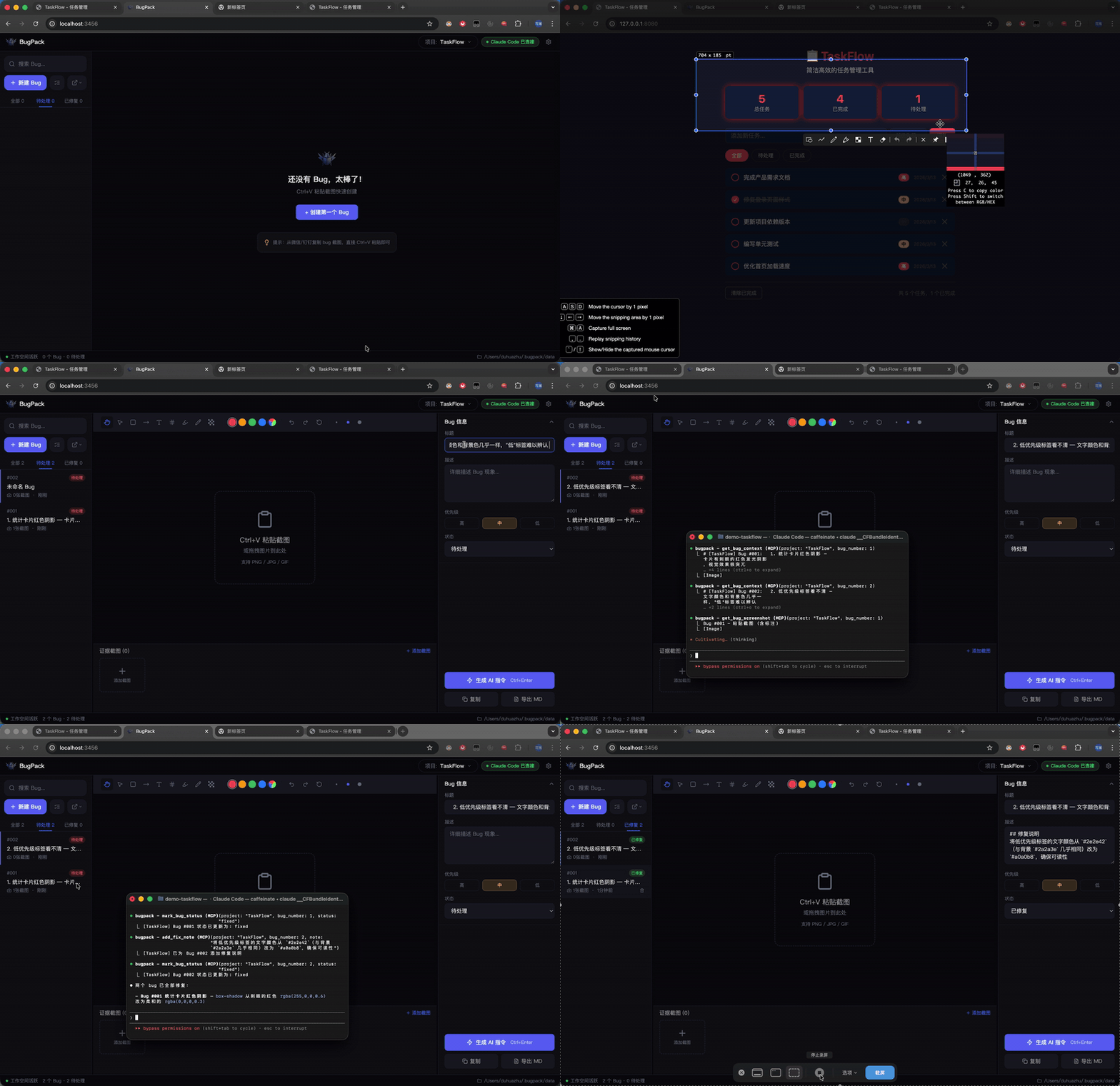
QA drops a screenshot in the chat → you `Ctrl+V` paste it into BugPack → annotate the issue → generate structured instructions → feed them to your AI coding agent.
|
|
|
|
Or skip the copy-paste entirely: BugPack's built-in **MCP Server** lets any MCP-compatible AI coding tool (Claude Code, Cursor, Windsurf, Cline, etc.) **read bug context and fix code automatically**.
|
|
|
|
## Why BugPack?
|
|
|
|
AI coding agents changed how we write code, but not how we **communicate bug context**.
|
|
|
|
Every bug fix still requires: save screenshot → create file → write paths → describe the issue → paste to AI.
|
|
10 bugs a day = **1-2 hours of pure repetition**.
|
|
|
|
BugPack compresses this to **30 seconds**.
|
|
|
|
## Requirements
|
|
|
|
- **Node.js** >= 18
|
|
- **OS** — Windows / macOS / Linux
|
|
- **Browser** — Chrome / Edge / Firefox (Chrome recommended)
|
|
|
|
## Quick Start
|
|
|
|
```bash
|
|
npx bugpack-mcp
|
|
```
|
|
|
|
Open `http://localhost:3456` and `Ctrl+V` your first bug screenshot to get started.
|
|
|
|
## MCP Configuration
|
|
|
|
BugPack works with **any MCP-compatible AI coding tool**. Here are common examples — configure other tools the same way.
|
|
|
|
**Claude Code** — add to `~/.claude.json`:
|
|
|
|
```json
|
|
{
|
|
"mcpServers": {
|
|
"bugpack": {
|
|
"type": "stdio",
|
|
"command": "npx",
|
|
"args": ["bugpack-mcp", "--mcp"]
|
|
}
|
|
}
|
|
}
|
|
```
|
|
|
|
<details>
|
|
<summary><b>Cursor / Windsurf / VS Code / Cline / Roo Code / Trae / MarsCode / Augment</b></summary>
|
|
|
|
**Cursor** (`.cursor/mcp.json`):
|
|
|
|
```json
|
|
{
|
|
"mcpServers": {
|
|
"bugpack": {
|
|
"command": "npx",
|
|
"args": ["bugpack-mcp", "--mcp"]
|
|
}
|
|
}
|
|
}
|
|
```
|
|
|
|
**Windsurf** (`~/.codeium/windsurf/mcp_config.json`):
|
|
|
|
```json
|
|
{
|
|
"mcpServers": {
|
|
"bugpack": {
|
|
"command": "npx",
|
|
"args": ["bugpack-mcp", "--mcp"]
|
|
}
|
|
}
|
|
}
|
|
```
|
|
|
|
**VS Code** (`.vscode/mcp.json`):
|
|
|
|
```json
|
|
{
|
|
"servers": {
|
|
"bugpack": {
|
|
"command": "npx",
|
|
"args": ["bugpack-mcp", "--mcp"]
|
|
}
|
|
}
|
|
}
|
|
```
|
|
|
|
**Cline / Roo Code** (VS Code Settings):
|
|
|
|
```json
|
|
{
|
|
"cline.mcpServers": {
|
|
"bugpack": {
|
|
"command": "npx",
|
|
"args": ["bugpack-mcp", "--mcp"]
|
|
}
|
|
}
|
|
}
|
|
```
|
|
|
|
**Trae** (`trae/mcp.json`):
|
|
|
|
```json
|
|
{
|
|
"mcpServers": {
|
|
"bugpack": {
|
|
"command": "npx",
|
|
"args": ["bugpack-mcp", "--mcp"]
|
|
}
|
|
}
|
|
}
|
|
```
|
|
|
|
**MarsCode** (Settings → MCP):
|
|
|
|
```json
|
|
{
|
|
"mcpServers": {
|
|
"bugpack": {
|
|
"command": "npx",
|
|
"args": ["bugpack-mcp", "--mcp"]
|
|
}
|
|
}
|
|
}
|
|
```
|
|
|
|
**Augment** (`augment/mcp.json`):
|
|
|
|
```json
|
|
{
|
|
"mcpServers": {
|
|
"bugpack": {
|
|
"command": "npx",
|
|
"args": ["bugpack-mcp", "--mcp"]
|
|
}
|
|
}
|
|
}
|
|
```
|
|
|
|
All other MCP-compatible tools follow the same pattern — just point `command` to `npx` and `args` to `["bugpack-mcp", "--mcp"]`.
|
|
|
|
</details>
|
|
|
|
Once configured, just tell your AI:
|
|
|
|
- **"Show me pending bugs"** → AI calls `list_bugs`
|
|
- **"Fix bug #3"** → AI calls `get_bug_context`, locates code, and fixes it
|
|
- **"Mark bug #3 as fixed"** → AI calls `mark_bug_status`
|
|
|
|
## OpenClaw Skills
|
|
|
|
BugPack provides [OpenClaw](https://github.com/openclaw/openclaw) Skills for AI agents that support the OpenClaw protocol.
|
|
|
|
**Install via CLI:**
|
|
|
|
```bash
|
|
clawhub install bugpack
|
|
```
|
|
|
|
**Or add to `~/.openclaw/openclaw.json`:**
|
|
|
|
```json
|
|
{
|
|
"skills": {
|
|
"entries": {
|
|
"bugpack": {
|
|
"enabled": true
|
|
}
|
|
},
|
|
"extraDirs": ["./skills"]
|
|
}
|
|
}
|
|
```
|
|
|
|
**Or manually**: copy the `skills/` directory from this repo into your workspace or `~/.openclaw/skills/`.
|
|
|
|
BugPack includes 3 built-in skills:
|
|
|
|
| Skill | Triggers | Description |
|
|
|-------|----------|-------------|
|
|
| `bugpack-list-bugs` | "show me bugs" / "list bugs" | List all bugs with status filtering |
|
|
| `bugpack-view-bug` | "view bug" / "bug context" | Get full bug details with screenshots and related files |
|
|
| `bugpack-fix-bug` | "fix bug" / "repair bug" | Read context → locate code → apply fix → update status |
|
|
|
|
Once installed, just tell your AI:
|
|
|
|
- **"Show me bugs"** → AI calls `bugpack-list-bugs`
|
|
- **"View bug details"** → AI calls `bugpack-view-bug`, shows screenshots and context
|
|
- **"Fix this bug"** → AI calls `bugpack-fix-bug`, locates code, fixes it, and marks as done
|
|
|
|
> **Note:** OpenClaw Skills require BugPack server running (`npx bugpack-mcp`). Skills communicate with the local server via REST API on `http://localhost:3456`.
|
|
|
|
## Features
|
|
|
|
### Screenshots & Annotations
|
|
|
|
- **Clipboard paste** — `Ctrl+V` to paste screenshots directly from any chat tool
|
|
- **Drag & drop** — drop image files onto the canvas
|
|
- **9 annotation tools** — drag/pan, select, rectangle, arrow, text, numbering, highlight, pen, mosaic
|
|
- **Compare mode** — side-by-side comparison of "current" vs "expected" behavior
|
|
- **Undo / Redo** — full operation history
|
|
|
|
### AI Instruction Generation
|
|
|
|
- **One-click generation** — produces structured Markdown fix instructions
|
|
- **Universal MCP support** — works with any MCP-compatible AI coding tool
|
|
|
|
### MCP Server
|
|
|
|
Built-in MCP Server lets AI coding agents **directly access bug context**:
|
|
|
|
| Tool | Description |
|
|
|------|-------------|
|
|
| `list_bugs` | List all bugs with status/project filtering |
|
|
| `get_bug_context` | Get full bug context (description + screenshots + environment + files) |
|
|
| `get_bug_screenshot` | Get a single annotated screenshot (base64) |
|
|
| `mark_bug_status` | Update bug status |
|
|
| `add_fix_note` | Add fix notes after repair |
|
|
|
|
### Platform Integrations
|
|
|
|
Import bugs from project management platforms, sync fix status back:
|
|
|
|
- **Zentao** · **Jira** · **Linear** · **TAPD**
|
|
|
|
### More
|
|
|
|
- **100% local** — data never leaves your machine, SQLite storage
|
|
- **Multi-project** — manage bugs independently per project
|
|
- **Dark / Light theme** — follow your preference
|
|
- **i18n** — Chinese / English
|
|
- **Keyboard shortcuts** — efficient workflow
|
|
|
|
## Workflow
|
|
|
|
```
|
|
Paste screenshot → Describe issue → Generate instructions → AI fixes code
|
|
│ │ │
|
|
│ ┌──────────────┘ │
|
|
▼ ▼ ▼
|
|
BugPack Copy Markdown MCP Server
|
|
Canvas paste to AI tool AI reads & fixes directly
|
|
```
|
|
|
|
## Data Storage
|
|
|
|
All data is stored locally:
|
|
|
|
- **Data directory**: `~/.bugpack/data/`
|
|
- **Database**: `bugpack.db` (SQLite)
|
|
- **Screenshots**: `uploads/{ProjectName}/{uuid}.{ext}`
|
|
|
|
## Tech Stack
|
|
|
|
| Layer | Technology |
|
|
|-------|------------|
|
|
| Frontend | React 18 · TypeScript · Tailwind CSS · Zustand |
|
|
| Annotation | Fabric.js v6 |
|
|
| Backend | Node.js · Express |
|
|
| Database | SQLite (better-sqlite3, WAL mode) |
|
|
| MCP | @modelcontextprotocol/sdk |
|
|
|
|
## Contributing
|
|
|
|
See [CONTRIBUTING.md](CONTRIBUTING.md) for guidelines.
|
|
|
|
|
|
## License
|
|
|
|
[MIT](LICENSE)
|
|
|
|
---
|
|
|
|
<div align="center">
|
|
|
|
**If BugPack saves you time, give it a Star!**
|
|
|
|
[](https://ko-fi.com/W7W51W5EN5)
|
|
|
|
<img src="https://raw.githubusercontent.com/duhuazhu/BugPack/main/assets/alipay.jpg" width="180" alt="Alipay"> <img src="https://raw.githubusercontent.com/duhuazhu/BugPack/main/assets/wechat.jpg" width="180" alt="WeChat Pay">
|
|
|
|
</div>
|